
| Select |
| Create an alpha channel from the image. |
| Syntax | |

|
|
[C#] void Select(SelectOptions inSelectOptions); [Visual Basic] Sub Select(inSelectOptions As SelectOptions) |
| Params | |
|
|

|
||||
| Name | Description | |||
|
|
|
|||
| inSelectOptions | The selection options. | |||
|
|
| Notes | |
|
|
This operation is only valid for canvases in raster formats. If the image is not a raster image it will be rasterized.
| See Also | |
|
|
| Example | |
|
|
[C#]
Canvas canvas = new Canvas(Server.MapPath("rez/boat.gif"));
canvas.Select(new SelectOptions(SelectOptions.SelectionType.NotColor, new XColor(Color.White), 10));
canvas.Export.UseAlpha = true;
canvas.SaveAs(Server.MapPath("Select_31.png"));
[Visual Basic]
Dim canvas As New Canvas(Server.MapPath("rez/boat.gif"))
canvas.Select(New SelectOptions(SelectOptions.SelectionType.NotColor, New XColor(Color.White), 10))
canvas.Export.UseAlpha = True
canvas.SaveAs(Server.MapPath("Select_31.png"))
The code above draws an image onto a canvas. It then selects everything that is white and saves the completed image with selection-as-alpha-channel into a png. The input and output images are shown below.

boat.gif
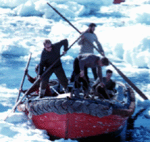
Select_31.png
| Example | |
|
|
[C#]
Canvas boat = new Canvas(Server.MapPath("rez/boat.gif"));
boat.Select(new SelectOptions(SelectOptions.SelectionType.NotColor, new XColor(Color.White), 10));
Canvas canvas = new Canvas(boat.Width, boat.Height, new XColor(Color.Red));
canvas.DrawCanvas(boat, new DrawOptions(true));
canvas.SaveAs(Server.MapPath("Select_31_1.png"));
[Visual Basic]
Dim boat As New Canvas(Server.MapPath("rez/boat.gif"))
boat.Select(New SelectOptions(SelectOptions.SelectionType.NotColor, New XColor(Color.White), 10))
Dim canvas As New Canvas(boat.Width, boat.Height, New XColor(Color.Red))
canvas.DrawCanvas(boat, New DrawOptions(True))
canvas.SaveAs(Server.MapPath("Select_31_1.png"))
The code above selects all the white - or nearly white - pixels in the image and replaces them with red ones before saving the final output as a JPEG. The final output is shown below.
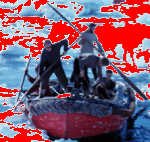
Select_31_1.png
| Example | |
|
|
The following code specifies rendering modes to modify existing selections. It will make all black and all white portions of an image blue.
[C#]
SelectOptions all = new SelectOptions(SelectOptions.SelectionType.All);
SelectOptions white = new SelectOptions(SelectOptions.SelectionType.Color, new XColor(Color.White));
SelectOptions black = new SelectOptions(SelectOptions.SelectionType.Color, new XColor(Color.Black));
white.RenderingMode = SelectOptions.RenderingModeType.Submin;
black.RenderingMode = SelectOptions.RenderingModeType.Submin;
Canvas boat = new Canvas(Server.MapPath("rez/boat.gif"));
boat.Select(all);
boat.Select(white);
boat.Select(black);
Canvas canvas = new Canvas(boat.Width, boat.Height, new XColor(Color.Blue));
canvas.DrawCanvas(boat, new DrawOptions(true));
canvas.SaveAs(Server.MapPath("Select_31_2.png"));
[Visual Basic]
Dim all As New SelectOptions(SelectOptions.SelectionType.All)
Dim white As New SelectOptions(SelectOptions.SelectionType.Color, New XColor(Color.White))
Dim black As New SelectOptions(SelectOptions.SelectionType.Color, New XColor(Color.Black))
white.RenderingMode = SelectOptions.RenderingModeType.Submin
black.RenderingMode = SelectOptions.RenderingModeType.Submin
Dim boat As New Canvas(Server.MapPath("rez/boat.gif"))
boat.Select(all)
boat.Select(white)
boat.Select(black)
Dim canvas As New Canvas(boat.Width, boat.Height, New XColor(Color.Blue))
canvas.DrawCanvas(boat, New DrawOptions(True))
canvas.SaveAs(Server.MapPath("Select_31_2.png"))
The first selection makes all portions of the image 100% opaque. The second would normally make all white portions of the image 100% opaque and all others 0% opaque. However because we're using the submin mode the effect is actually to subtract 100% from the current opacity where the image is white and to subtract 0% where the image is not white. The same effect occurs in the third line and black is made transparent.
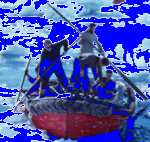
Select_31_2.png