| eForm FDF Example | ||

|
||
|
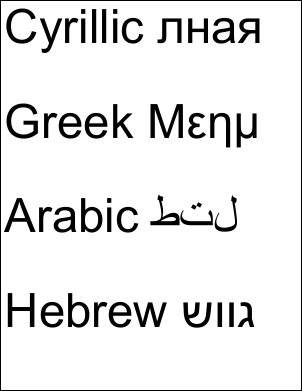
This example shows how to extract Unicode annotation values from an eForm FDF file.
|

Src
|
First we create an ABCpdf Doc object and read in our FDF file.
using var fdf = new Doc();
fdf.Read("../Rez/form.fdf");
|
Dest
|
We find out how many items there are in the FDF file and prepare to iterate through them.
string theValues = "";
int lastID = Convert.ToInt32(fdf.GetInfo(0, "Count"));
|
Add
|
We go through each item. We check to see if it is an annotation. If it is we check to see if the annotation type is text. If we have found a text annotation we extract the content and add the value to our list.
// extract annotation values (for insertion into PDF)
for (int i = 0; i <= lastID; i++) {
  string theType = fdf.GetInfo(i, "Type");
  if (theType == "anno") {
    if (fdf.GetInfo(i, "SubType") == "Text") {
      string theCont;
      theCont = fdf.GetInfo(i, "Contents");
      theValues = theValues + theCont + "\r\n\r\n";
    }
  }
}
// extract field values (for demonstration purposes)
for (int i = 0; i <= lastID; i++) {
  int theN = fdf.GetInfoInt(i, "/FDF*/Fields*:Count");
  for (int j = 0; j < theN; j++) {
    string name = fdf.GetInfo(i, "/FDF*/Fields*[" + j + "]*/T:Text");
    string value = fdf.GetInfo(i, "/FDF*/Fields*[" + j + "]*/V:Text");
    // here we would do something with the field value we've found
  }
}
|
Save
|
Finally we add the Unicode text to a new document and save it.
using var doc = new Doc();
doc.Font = doc.EmbedFont("Arial", LanguageType.Unicode, false, true);
doc.FontSize = 96;
doc.Rect.Inset(10, 10);
doc.AddText(theValues);
doc.Save("fdf.pdf");
|
Results
|
This is the kind of PDF you might expect to produce.
|