| AddBookmark Function | ||

|
||
|
Adds a bookmark pointing to the current page.
|

Syntax
|
[C#]
|
Params
|
Notes
|
Adds a bookmark which points to the current page. Bookmarks are specified as paths in much the same way as file paths. Headings and subheadings are separated by a backslash character. For example: "1. Introduction\1.1 Aim and Methods\1.1.3 Diagrams" When a bookmark is added, intermediate headings and subheadings will be created if they do not already exist. To add multiple bookmarks all referring to the same page simply call the AddBookmark function multiple times. This function returns the Object ID of the newly added Bookmark Object.
|
Example
|
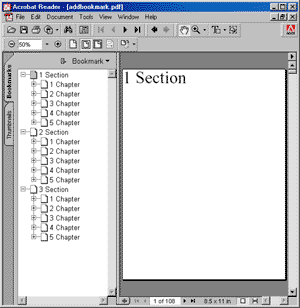
The following code adds a sequence of pages with a nested sequence of bookmarks. The image shows the appearance of the document outline. Note that none of the subject pages are visible because the chapter pages were added in a collapsed state.
using var doc = new Doc();
doc.FontSize = 64;
for (int i = 1; i < 4; i++) {
  doc.Page = doc.AddPage();
  string theSection = $"{i} Section";
  doc.AddText(theSection);
  doc.AddBookmark(theSection, true);
  for (int j = 1; j < 6; j++) {
    doc.Page = doc.AddPage();
    string theChapter = $"{theSection}\\{j} Chapter";
    doc.AddText(theChapter);
    doc.AddBookmark(theChapter, false);
    for (int k = 1; k < 7; k++) {
      doc.Page = doc.AddPage();
      string theSubject = $"{theChapter}\\{k} Subject";
      doc.AddText(theSubject);
      doc.AddBookmark(theSubject, true);
    }
  }
}
doc.Save("docaddbookmark.pdf");
Also see example code in: CustomFont CustomFont Function.
|