| ToGrayscale Function | ||

|
||
|
Converts the image to grayscale.
|

Syntax
|
[C#]
|
Params
|
Notes
|
This allows you to convert an image to grayscale. It can be useful for preparing soft masks. This function is a convenience method for this common operation. A practically identical effect can be achieved using the Recolor method followed by Compress.
|
Example
|
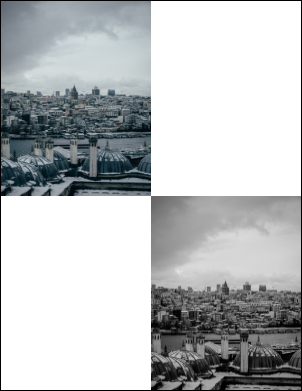
Here we add an image in its natural color space and then, at a position down and to the right, converted to grayscale.
using var doc = new Doc();
doc.Rect.Pin = XRect.Corner.TopLeft;
doc.Rect.Magnify(0.5, 0.5);
string path = "../mypics/mypic.jpg";
doc.AddImageFile(path, 1);
doc.Rect.Move(doc.Rect.Width, -doc.Rect.Height);
int i = doc.AddImageFile(path, 1);
var im = (ImageLayer)doc.ObjectSoup[i];
im.PixMap.ToGrayscale();
doc.Save("pixmaptograyscale.pdf");
|