| Reset Function | ||

|
||
|
Reset to the identity.
|

Syntax
|
[C#]
|
Params
|
Notes
|
This method resets the transform to it's original state. This state is known as the identity and indicates that no transformation will be applied.
|
Example
|
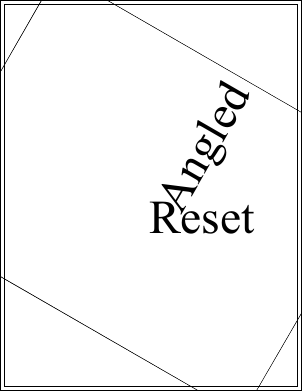
Here we add some text rotated at 60 degrees around the middle of the document. We then reset the transform and draw some more text. This text is drawn with no rotation because the transform has been reset.
using var doc = new Doc();
doc.Rect.Inset(10, 10);
doc.FontSize = 96;
doc.Transform.Rotate(60, 302, 396);
doc.Pos.String = "302 396";
doc.AddText("Angled");
doc.FrameRect();
doc.Transform.Reset();
doc.Pos.String = "302 396";
doc.AddText("Reset");
doc.FrameRect();
doc.Save("transformreset.pdf");
Also see example code in: XTransform Rotate Function, FontObject RuneWidths Property, FontObject Widths Property, Page GetBitmap Function.
|