| Rotate Function | ||

|
||
|
Rotate about a locked anchor point (angle in degrees).
|

Syntax
|
[C#]
|
Params
|
Notes
|
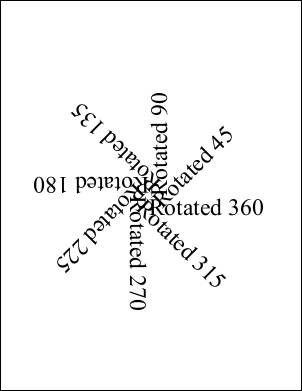
This method rotates the world space about a locked anchor point. The angle is specified in degrees anti-clockwise.
|
Example
|
Here we add a number of chunks of text rotated at different angles about the middle of the document.
using var doc = new Doc();
doc.FontSize = 48;
doc.TextStyle.Indent = 48;
for (int i = 1; i <= 8; i++) {
  int angle = i * 45;
  doc.Pos.String = "302 396";
  doc.Transform.Reset();
  doc.Transform.Rotate(angle, 302, 396);
  doc.AddText($"Rotated {angle}");
}
doc.Save("rotate.pdf");
Also see example code in: ABCpdf Landscape Example, Doc AddGrid Function, Doc AddXObject Function, Doc Transform Property, XTransform Invert Function, XTransform Reset Function, XTransform AngleUnit Property, FontObject RuneWidths Property, FontObject Widths Property, Page Rotation Property, XpsImportOperation Import Function.
|